Your Client Has 800 Photos to Choose From. They'll Get Back to You Next Christmas.
The edit is done. The favourites list is not. Somewhere, a couple is on photo 412, comparing two identical frames.
They love every photo. That is exactly the problem…
So, you've culled a wedding down to 800 images and sent the proofing gallery. Online photo proofing should take an evening: tap the favourites, pick the album shots, done. The couple reply: “These are AMAZING!! We'll pick our favourites tonight.”
Short answer: Photo proofing means giving clients a curated gallery so they can pick favourites for retouching, an album or prints. Agree the selection limit and the deadline up front, give them one clear way to send feedback, and get the final choice confirmed before you start the next stage.
Tonight.
Four weeks later, the favourites folder is emptier than the jollof tray ten minutes after the MC says food is ready.
They've narrowed it down to 793. Auntie has views on another 40.
Someone has started a poll.

I photograph weddings at The First Studios, so trust me, nobody here is the villain. Your client is happy. They're just stuck. Your job is to get them unstuck without a single passive aggressive email.
What does online photo proofing actually mean?
Proofing is when you show images so the client can make one specific decision before the next bit of work. Choose 20 portraits for retouching. Pick 40 for the album. Approve product shots before the final export.
It's not the same as delivering the finished gallery. If every photo is already edited and in the package, you might not need a proofing stage at all.
Skip it. Have a nap.
And don't invent a selection limit on the spot. Use the number in your booking agreement, and tell them why they're choosing.
“Choose your favourites” is a vibe, not an instruction…
It sounds clear until you meet a human. How many? By when? What happens after? Does a heart mean “print this” or “I look nice here”?
So say it plainly: what a favourite means, how many to pick, the date you need them by, and what happens next.
“Your preview gallery is ready. Please mark up to [number] favourites by [date]. Leave a comment on any image that needs a specific change. When you're done, tell me the selection is final and I'll start the next agreed stage.”
One route for feedback. One final approver if the whole family is involved. You're making an album, not chairing a committee.

Your Client Has 800 Photos to Choose From. They'll Get Back to You Next Christmas.
Take the idea into a real project. The editable tool runs in your browser, with no Veyra signup needed.
Open the free tool ↗Seven identical frames is not a choice. It's an exam…
Use sections that make sense: getting ready, ceremony, portraits, reception. For brands: products, lifestyle, team portraits.
Then be brave and cull properly. If seven frames differ by one eyelash, your client will study all seven like a crime scene.

Before you send it, open the gallery on your phone, logged out, like a client would. Tap a favourite. Leave a comment. If you catch yourself asking “where did that button go?”, they will ask it too.
At 11pm. On WhatsApp.
Before you press send, run the nine question test…
There's a free photo proofing checklist with this note. It walks you through nine decisions, from gallery structure and selection instructions to privacy, deadlines, downloads, a phone test and final approval.
Tick through it, then copy a client ready message at the end. It doesn't take photos or build a gallery. It's a small browser tool for the five minutes before you send the real thing, when confidence is high and attention is low.
The gallery is the bit they'll actually remember…
Veyra's client galleries do favourites, comments, privacy controls and downloads, and clients can submit their selection when they're done. The preview below is the real interface.
A gallery isn't storage with a nice border. It's the moment your client sees what you made for them. Make that moment calm and obvious, and they'll come back to it for years.
And when your couple finally submit their album picks?
Clap quietly. You've both earned it.

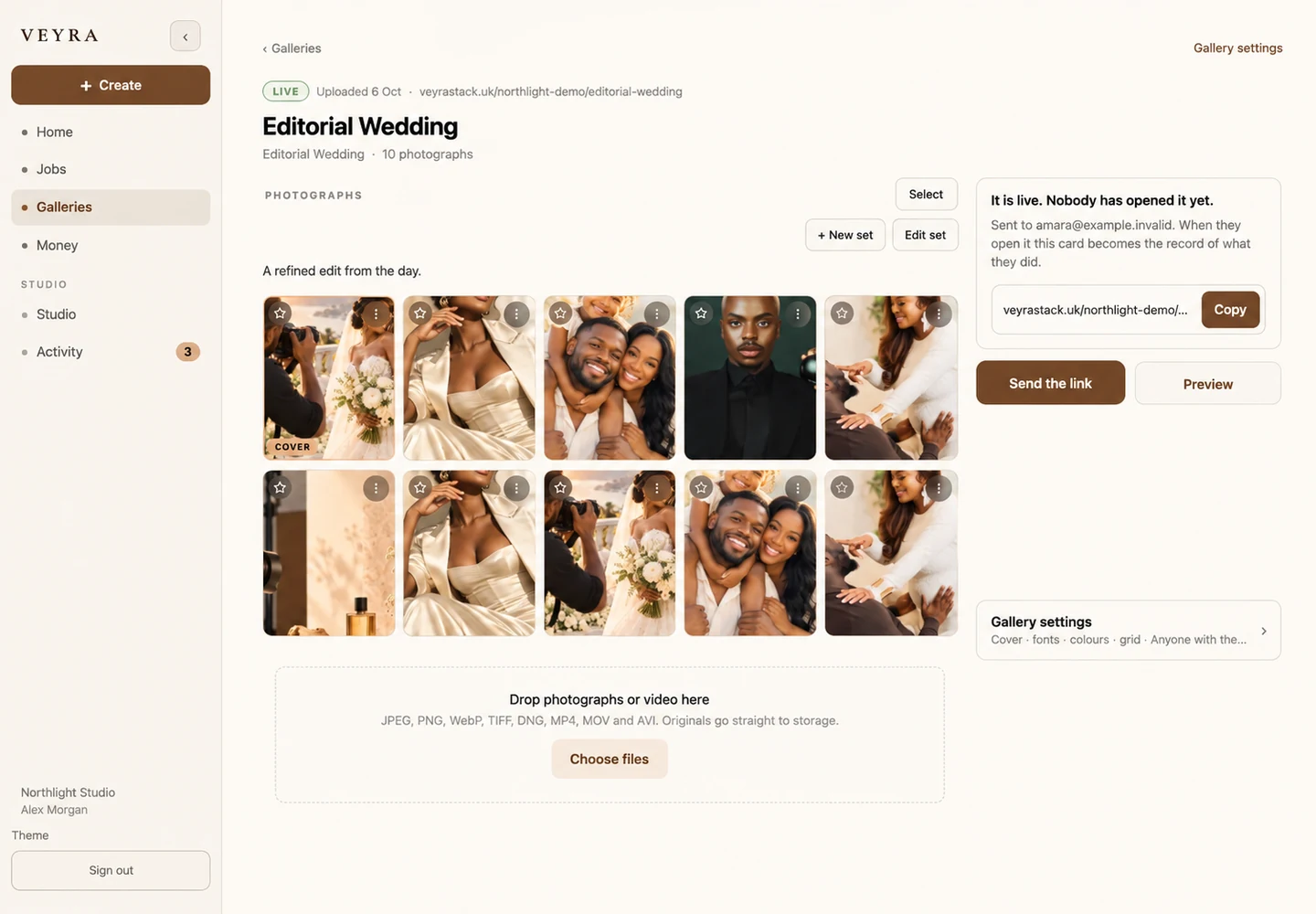
Explore the real features, not a fictional mockup. See this part of Veyra →
Discussion
Thoughts, questions or something you would add?